CareWall Nederlands

For home care and community nursing

One app for your care team, with families close by

Your carers keep their route, their client files and their team in one pocket. Clients' families join as soon as you invite them. That saves phone calls, loose messages and double work.

  • Voice reporting, with a check before anything is saved
  • Invite families with a code, a link or a QR code
  • Works with Nedap Ons
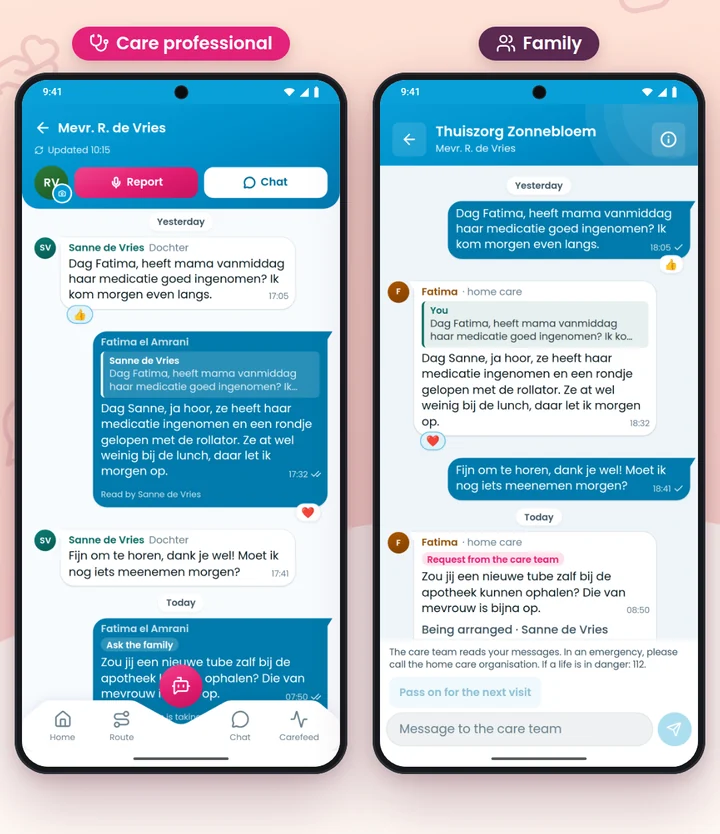
Two phones with CareWall: the carer answers a question from the family in the chat, and the family reads the care team's answer

A day with CareWall: the app for home care and community nursing

From the first client to the handover: your carer has everything at hand and no longer relies on paper or memory.

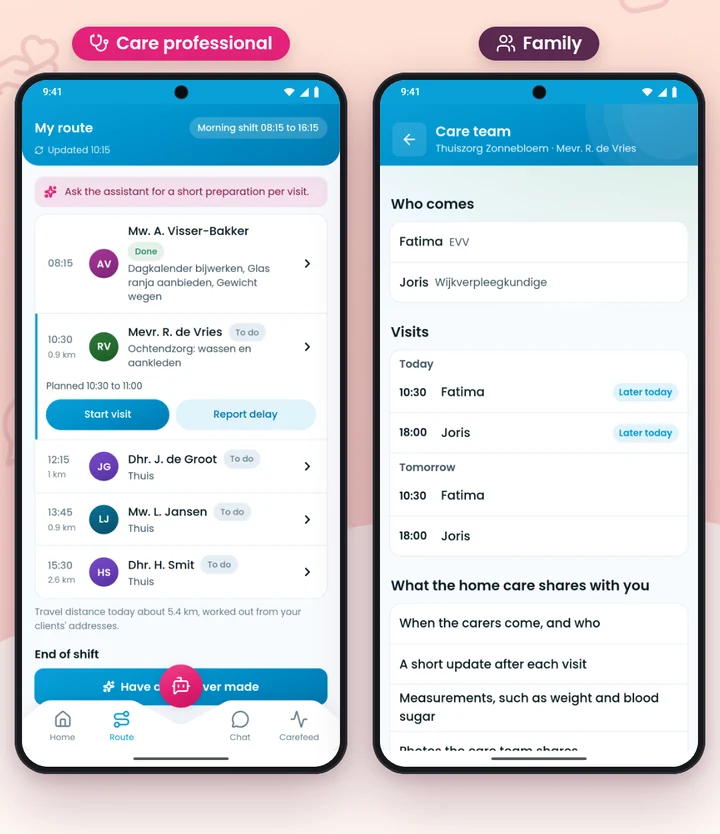
Left the carer's My route with the visits of the day, right the family seeing who comes when

My route: today's visits at a glance

When the app opens, your carer sees where she is going next, and in what order. One tap opens the visit, with the client's file right there.

  • The day's visits, in order
  • From the visit straight to the client file
  • The family sees who comes when
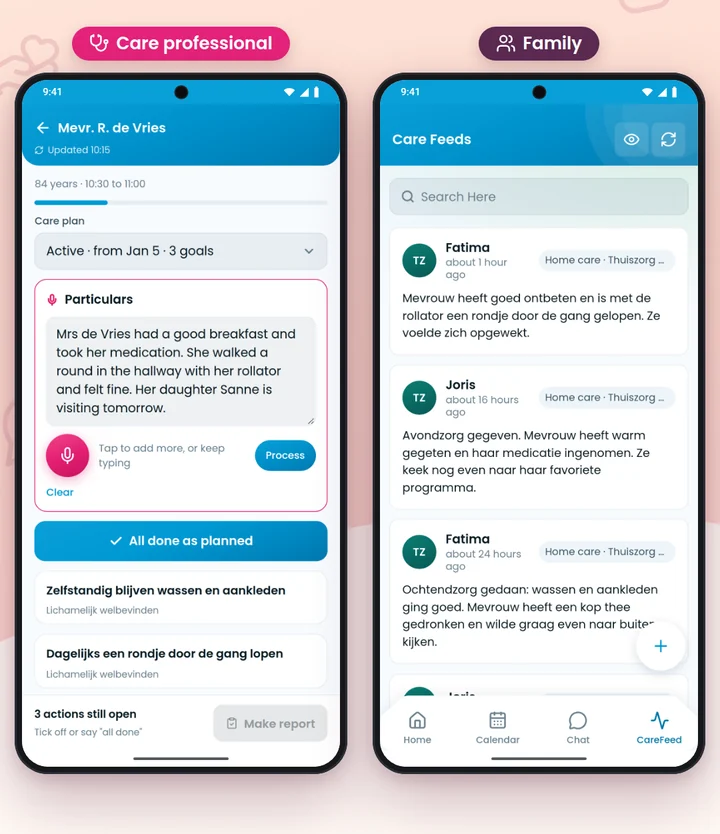
Left making a report with the care plan and the microphone button, right the short update the family sees after the visit

Reporting by voice

After the visit your carer speaks the report, or types it. If that is all there is to say, she just says "all done". Before it is saved she checks it one more time: Is this right?

  • Speak or type, whatever suits the moment
  • Always "Is this right?" before it is stored
  • The report belongs to the right care plan
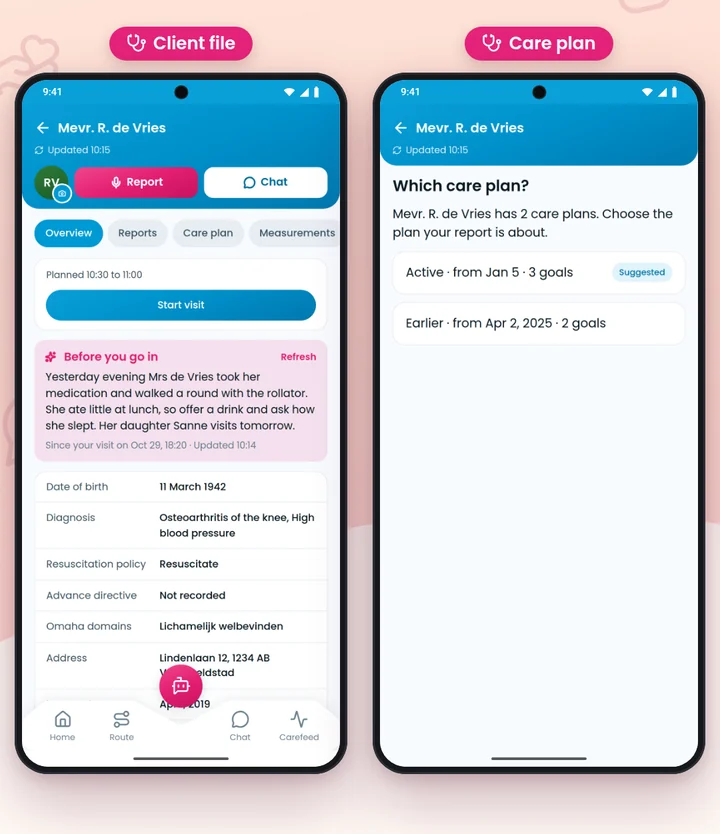
Left a client file, right the question which care plan the report belongs to

The client file, and always the right care plan

What do I need to know before I walk in? Your carer looks it up in the client file, without calling the office. Does a client have more than one care plan? Then she picks the plan the report is about; the active plan is suggested.

  • The client's file in the app
  • The care plan with the goals you work towards
  • More than one care plan: first the question which one

Notifications

Notifications for news your carer needs, so nothing is left lying around.

Handover

A handover to the colleague who takes over, inside the app and not in a loose message.

The team: talk, plan and sort things out in the same app

What your team needs from each other sits in the same app as the care work itself.

Team chat

Ask a colleague something quickly, without swapping private numbers.

Carefeed

News, compliments and announcements for the whole team in one place.

Roster

Carers see in the app when they work.

Hours and leave

Log hours and request leave from the phone.

Expense claims

Submit expenses without carrying receipts to the office.

Learning in the app: Academy and Knowledge base

Training and keeping standards up do not have to sit apart from the work.

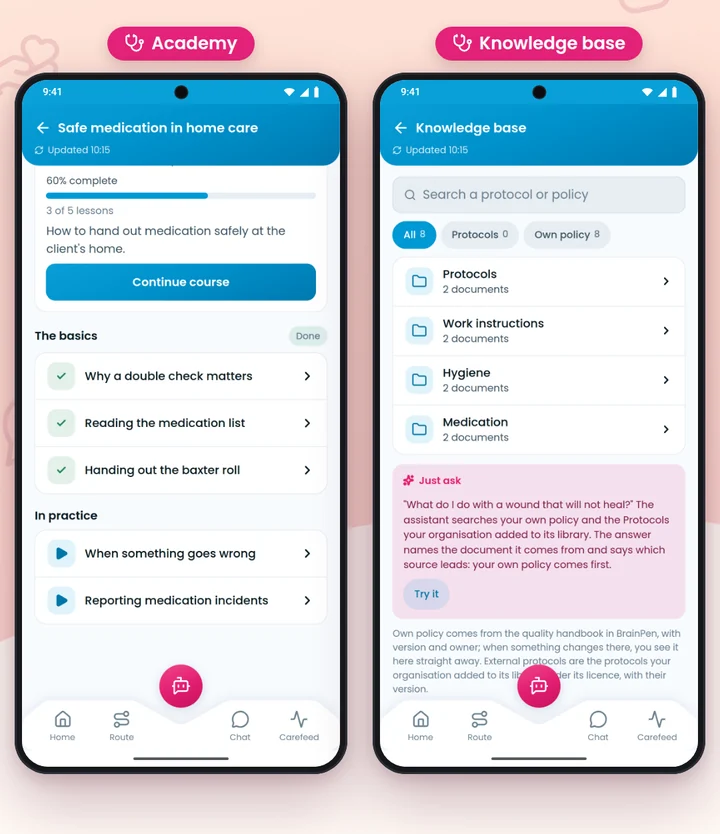
Left a lesson in the CareWall Academy, right the Knowledge base with folders per subject

An Academy with certificates, and your own Knowledge base

Short lessons on the phone; whoever finishes a course gets a certificate for it (the courses are in Dutch). Protocols and work instructions go in your own folders, and per role you decide who sees which folder. An assistant in the app helps with questions.

  • Lessons with a certificate
  • Your own folders and subfolders
  • Decide per role who sees what

Involve families in home care, without the hassle

Families want to know how things are going. Your team does not want to phone all day. In CareWall the family joins the care of their loved one, under your direction.

How you invite a family

  1. 1

    Consent first

    You record that the client, or their legal representative, agrees to the family following along.

  2. 2

    Then the invitation

    You invite a family member with a code, a link or a QR code. They simply scan it in the app.

  3. 3

    And the family joins

    The family makes an account in the CareWall app and from then on sees the care of their loved one.

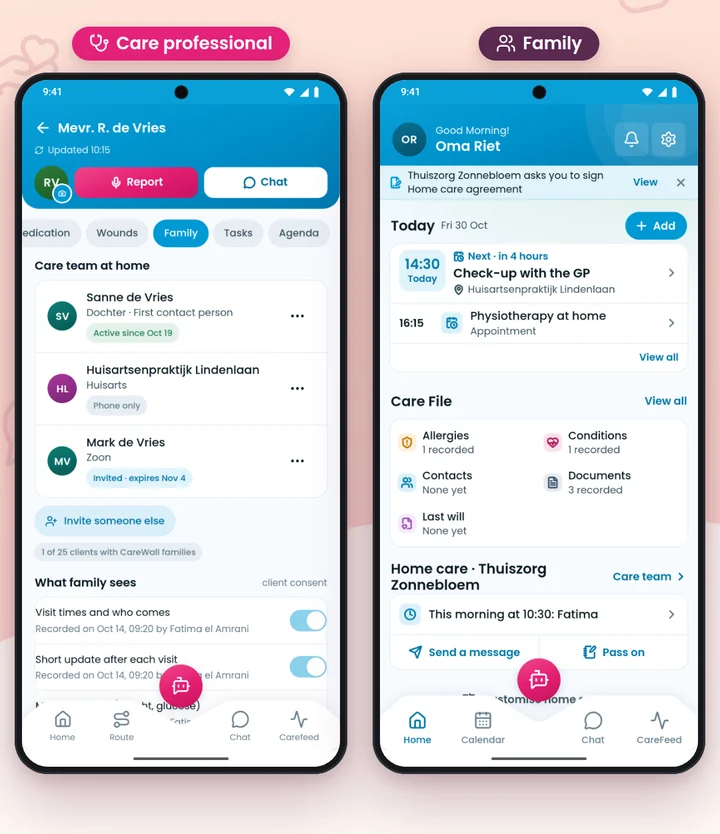
What families see

  • The visits of the carers
  • Messages between the family and your team
  • The care team around their loved one
Left the Family tab of a client in the carer's app, right the family member's home screen with their home care
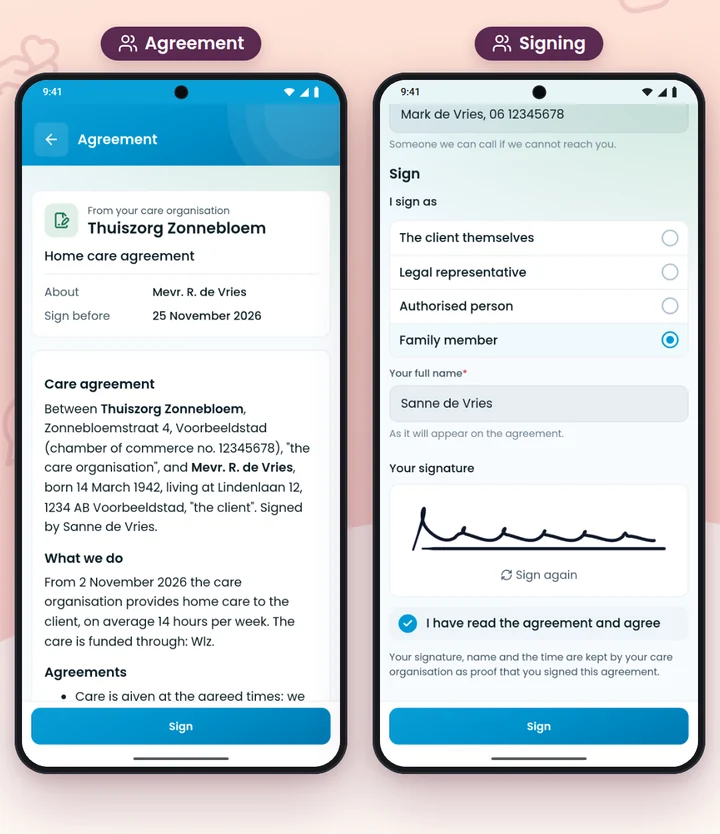
A care agreement in the CareWall app: left the home care's agreement, right filling it in and signing with a finger

Sign a digital care agreement in the app

Families sign care agreements in the app. You send the agreement, the family member reads it on the phone, fills in their part and signs with a finger. The signed agreement is then kept for both sides.

Works with Nedap Ons and BrainPen

You do not have to turn everything upside down. CareWall works with Nedap Ons, the system many care organisations already use, and with BrainPen. What that means for your organisation, we are happy to show you in a demo.

  • Nedap Ons You keep working in the system you know.
  • BrainPen Where your organisation and your agreements are set up.
  • Even without coverage If your carer has no connection, the work waits in a queue and goes along as soon as it can.

Nedap Ons is a product of Nedap. CareWall is not part of Nedap and is not endorsed by Nedap.

Secure sign-in, only within the care relationship

Client data should not be out in the open. This is how the app handles it.

Two-step sign-in
Carers can protect their sign-in with a second step: after the password, the app asks for a code sent by email.
PIN as a lock
The 5-digit PIN only locks the phone. It comes on top of signing in, not instead of it.
Only within the care relationship
You only see the clients and data you are responsible for. Families only see their own loved one, and only after consent.
Access log
When a carer opens a client outside today's route, that opening is recorded in an access log.

Frequently asked questions from care organisations

Which organisations is CareWall for?

CareWall is an app for home care and community nursing: for teams of carers who visit clients at home, and for those clients' families.

What can a carer do with the app?

She sees her route and visits, opens a client's file and care plan, reports by voice or by typing, and checks the report with Is this right? before it is saved. Chat, roster, hours, leave and expense claims are in the app too, as are the Academy and the Knowledge base.

Does CareWall work with Nedap Ons?

Yes, CareWall works with Nedap Ons and with BrainPen. What that means for your organisation, we gladly go through in a demo.

How do I involve families in the care?

You invite a client's family member with a code, a link or a QR code. The family then sees the visits, the messages with your team and the care team around their loved one, in the CareWall app.

When may I invite a family?

Only after consent. You first record that the client or their legal representative agrees, and then you invite the family.

Can a family sign a care agreement digitally?

Yes. Families sign care agreements in the app: they read the agreement on the phone, fill in their part and sign with a finger.

How do carers sign in?

With their email address, a password and a code for the second step. The 5-digit PIN is only a lock on the phone.

Does the app work without coverage?

Yes. Without a connection the work waits in a queue and goes along as soon as there is coverage again.

Request a demo

Leave your details. We will get in touch and show you how CareWall fits your team. Your request goes to our team as an email; we store nothing on the website itself.

By sending this you agree that we use your details to get in touch. Read the privacy policy.